FACT CHECKED
Most organizations now rely on a mix of legacy software and cloud-based offerings. This means new software introductions can become more complex and often entail a wider range of unexpected costs.
This wave of adoption creates a familiar problem. We fixate on acquiring new software while overlooking the costs of actually implementing it.

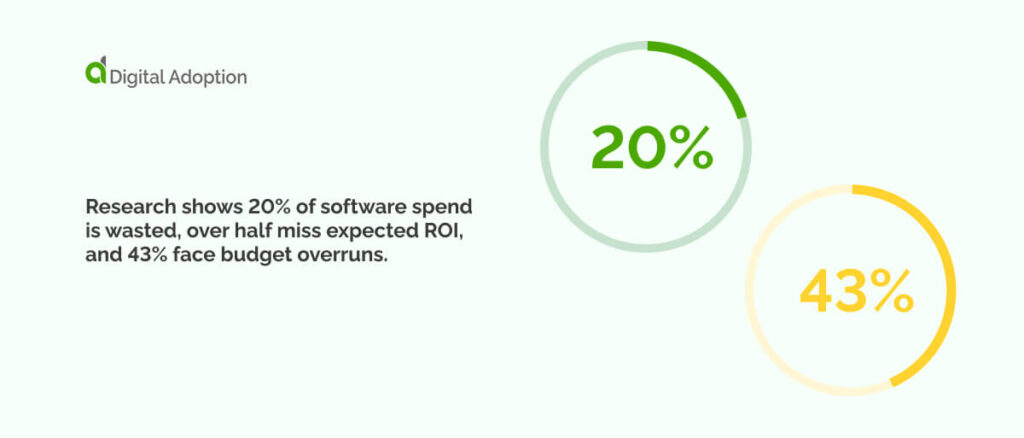
Research shows 20% of software spend is wasted, over half miss expected ROI, and 43% face budget overruns. Those numbers highlight a pattern: many projects cost more and deliver less because the effort involved isn’t fully understood at the start.
Much of this only becomes clear once implementation begins, which is why budgets stretch, and results fall behind.
This article breaks down every component of software implementation costs, helping you plan with accuracy, identify price risks early, and ensure deployments genuinely support long-term digital transformation.
Why is understanding software implementation costs important?
Understanding software implementation costs matters because adoption should accelerate capabilities and not inhibit them.
Software contracts only represent the surface costs, with the real spend appearing in the work that follows. This includes configuring the system, data lifecycle management, integrating with legacy apps, training manuals, and support and maintenance needs that make the solution viable across workflows.
Many tech procurers underestimate or miscalculate these parts. Overlooking these blind spots during the tech buying process results in wasted resources and lock-ins to solutions that end up taking value away instead of generating it.
Overlooked implementation costs can also undermine software pricing strategies. For example, SaaS pricing may seem obvious at the outset, but it often masks additional costs as team projects and objectives scale.
Inadequate software implementation also impacts data quality when the correct configuration, integration, and migration processes are not properly set up. This can lead to data silos forming in critical information sets, which become skewed and generate inaccurate results.
The cost of retroactively correcting these fixes can far exceed the initial costs of arranging these requirements up-front.
What are the core costs associated with software implementation?
Understanding the core costs of software implementation means looking beyond the licence cost. It also means recognizing the work required throughout the entire system lifecycle to ensure functions operate as intended.
| Cost Area | What it covers |
| Software licences | Access-only, excluding the configuration and setup work that organizations overlook. |
| Hardware & infrastructure | Hardware upgrades, network capacity, identity controls, and storage needs. |
| Implementation services | Configuration, data migration, integration testing, and process setup. |
| Training | User adoption, DAP support, advanced training, and ongoing sessions. |
| Testing & QA | Data checks, permissions, integrations, and functional validation. |
| Support & maintenance | Patches, updates, corrections, help-desk tasks, and regulatory-driven changes. |
| Pre-deployment optimisation | Data cleaning, workflow refinement, and access adjustments. |
Software licences
The cost of software licences only reveals the starting point but fails to reflect the actual long-term costs that show up post-go-live. They permit access to the software but don’t reveal the spend required to shape it into a bespoke organisational solution. Many tech buyers underestimate the additional effort that lies outside the licence price.
Hardware and infrastructure costs
Some projects need updates to hardware or network capacity before the new software can run properly. Even cloud-based tools rely on steady connections, secure access, and enough storage. Older systems often struggle with these requirements, and the gaps usually surface once implementation work is underway. These unexpected adjustments increase the overall cost and delay delivery.
Implementation services
Implementation services involve configuration, data migration, integration, and process setup. This defines how the system behaves and how users interact with it. Unstrategic decisions here compound long-term issues, such as unreliable reporting or inconsistent digital workflows. Retroactively fixing these problems later requires more effort than setting them up correctly at the start, ultimately increasing total cost.
User training
User training ensures that employees and diverse teams can use the system efficiently. Some users need contextual in-app guidance, such as a digital adoption platform (DAP); others require remote training and greater effort, especially when handling sensitive information. Sporadic training can disrupt workload norms, so you need to be aware of critical employee training do’s and don’ts. Underestimating training leads to low adoption rates and increased support needs down the road.
Testing and quality assurance
Testing and quality assurance (QA) processes ensure the software works as expected in different scenarios and test environments. It scrutinizes data accuracy, user permissions, integrations, and overall function behaviour. Organizations sometimes rush through testing phases, increasing the risk of issues appearing post-go-live. Remedying these problems once the system is active is more expensive than resolving them earlier in the process.
Support and maintenance
Support and maintenance are ongoing costs incurred after rollout. They include patches, regular updates, corrective maintenance, and vendor help desk assistance. They also cover changes needed when policies, processes, or regulatory stipulations change. These activities continue throughout the system’s lifecycle and account for a significant share of long-term spend.
Optimization pre-deployment
Pre-deployment optimization prepares data, roles, and workflows before going live. This may include cleaning outdated and redundant data, refining approval paths, or adjusting user access and permission controls. These activities can become slow and are sometimes skipped in the pre-planning phase; however, they shape how refined a system is once it goes live.
What additional software implementation costs should you consider?
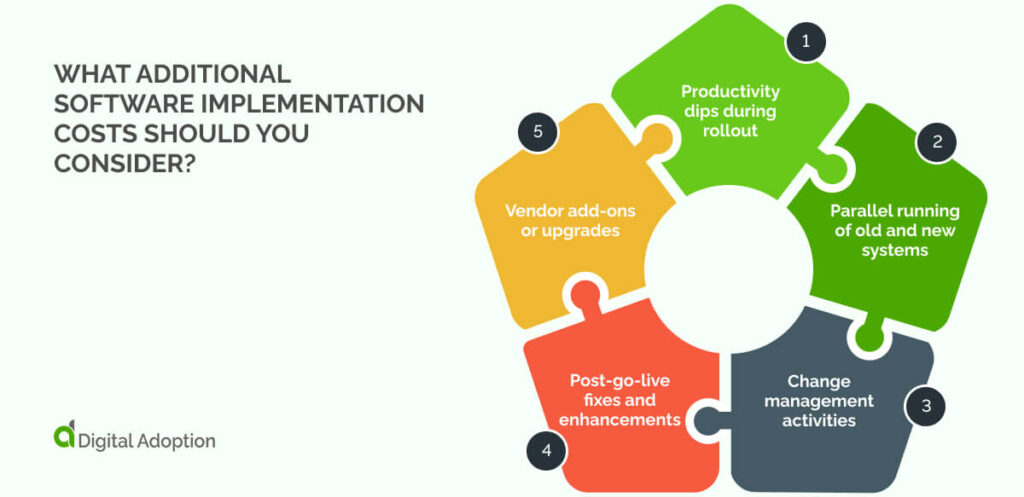
Budgets often cover the visible parts of implementation but overlook the surrounding work that still needs time, money, and attention. These elements usually fall outside the contract, yet they have a direct impact on how well the rollout takes shape and how the software performs once it’s live:
Productivity dips during rollout
Employees spend part of their week learning the new system and adjusting their routines. Productivity levels slow because people divide their focus between existing tasks and new screens. Managers can also lose time on approvals, clarifications, and follow-up. These dips are temporary but present enough to influence deadlines and resourcing plans.
Parallel running of old and new systems
Many teams keep both systems active for a short period. This reduces the chance of data gaps or process missteps. It also means double entry in some cases. Dual platforms require extra monitoring, additional storage, and more coordination among teams who handle reconciliation.
Change management activities
People need guidance on what is changing, how their tasks will shift, and what the new process expects from them. Workshops, internal documentation, role-based walkthroughs, and updated work instructions all take planning. Without these steps, confusion grows and adoption slows. These activities often fall outside SOWs and need their own budget.
Post-go-live fixes and enhancements
Once a system is live, you uncover configuration gaps, reporting mismatches, permission issues, and data inconsistencies. These are normal, but they require extra sessions with the vendor or internal admins. Some refinements are small. Others require more structured review cycles. Remember that each one pulls additional hours that were not always forecast.
Vendor add-ons or upgrades
Implementation exposes features that seemed optional at the start but become essential for workflows, auditing, and integrations. Vendors may also release new modules during the rollout that influence forthcoming plans. These expansions add licence adjustments, testing hours, and more configuration steps that must be accounted for.
How to estimate software implementation costs
Now that we’ve thoroughly explored both direct and indirect, ongoing costs of the software implementation process, we can estimate the implementation cost. These directives aren’t a full list of methods, but they offer a solid way to produce an estimate that CIOs and CFOs can rely on:
| Step | How to estimate |
| Define scope and timeline | List required features, expected users, and the time needed to set everything up. Use these numbers to outline the project’s size and length. |
| Split costs into clear groups | Separate licence fees from setup work, data tasks, support, and preparation so each area has its own estimate. |
| Check vendor quotes and in-house effort | Combine vendor pricing with internal time, specialist help, and any slowdown during the switch. |
| Add contingencies and overlooked items | Include connectors, data fixes, permission updates, reporting needs, and post-launch adjustments. |
| Compare rollout options | Estimate the cost difference between phased and full deployment based on time, workload, and disruption. |
- Define the scope and establish a timeline: Figuring out how long the implementation period will take, which features and functions are needed, and how many employees intend to use it can reveal a lot. These measurable criteria are required to define the process scope and establish trusted implementation timelines. Once these estimates are factored in, a clearer picture of spend emerges.
- Divide costs into distinct categories: Different cost segments cannot simply be lumped into a single financial parameter. Costs need to be divided into distinct categories, with licences signifying the surface costs. Ongoing and hidden fees, such as configuration, data training, support, and pre-deployment preparation, need to be categorized to enable more accurate and reliable budget forecasts and greater confidence in future spend.
- Use vendor quotes and internal effort estimates: Vendor quotes are key, but they don’t reflect in-house outgoing expenses. In-house estimates must include time taken away from routine employee work, specialist support, and productivity dips during the transition to new digital tools.
- Factor in contingencies and hidden items: Implementation costs need to factor in hidden items that are essential for ongoing functionality. The cost of some of these items was covered in the section above and includes extra connectors, data tweaks, adjusting permissions, reporting requirements, post-go-live corrections, and vendor add-ons. Ignoring these unassuming items can lead to inaccurate cost estimates.
- Compare scenarios: Weigh different rollout paths. A phased rollout takes longer but disrupts less. A full deployment is faster but demands more configuration, migration work, and employee time. Each option changes spending, workload, and readiness.
How to measure the return on investment (ROI) from software implementation costs?
Software implementation costs undoubtedly minimize spending compared to the higher cost of fixing issues retroactively after deployment. While this is a win on strategic expenditures, investments are only justified when returns exceed their total cost.
Let’s look at methods for measuring the return on software implementations so that spending is justified by both the value and the monetary gains they create:
Identify the goals of the implementation
Without a clear objective or benchmark for success, measuring whether software implementations are generating returns has only vague goalposts to go by.
- What were the goals of adopting the software?
- Were they to manage data more efficiently, fast-track operations, or automate tasks to enhance employee productivity?
Defining the success metrics of adoption provides an unambiguous outline for measuring returns.
Define the costs to include
As with implementation costs, which are measured both directly and indirectly, determining ROI also requires accounting for as many costs as possible.
Beyond the visible sticker price, calculate all other costs, e.g., configuration, data migration, service support, and technical fixes post-go-live. Leaving these aspects out of the equation weakens the final ROI calculation, so ensure they are factored in.
Measure productivity and efficiency gains
More often than not, software adoption is aimed at heightening productivity and operational efficiency. Not measuring these gains only works to mystify investment wins.
Track the time spent on tasks pre-implementation and the time saved after going live. Measuring these two side by side will reveal the gains made and if value is being generated. Measure system error rates beforehand and compare them with those that appear after rollout. These changes indicate whether workload pressure is easing or intensifying.
Quantify financial benefits
Gauging the financial return on investments is a major factor in assessing ROI. Beyond the non-monetary value generated, assign numbers to lowered spend on legacy tools, fewer contractor hours, reduced rework from flawed or skewed data, and time saved on audit preparation. These tangible figures collectively inform the financial return.
Estimate the payback period
Comparing how long it takes to see tangible returns and how quickly implementations reach time-to-value against the cost of full implementation will provide a clear picture for ROI.
If time-to-value is rapidly achieved, it indicates that returns are being generated. If payback periods become lengthy, it is likely that more optimization work is still needed.
Calculate ROI
This represents a material method for directly assessing whether implementations are generating returns.
ROI can be calculated using a simple formula: (Total benefits – Total costs) ÷ Total costs. The result yields a clear figure that shows whether the investment is generating value or depleting resources.
Track results after going live
Measuring ROI isn’t a static process that ends once implementations are over. Tracking must continue after rollout.
Software behaviour evolves as daily use increases, seats scale, features are introduced, and new needs emerge. Monitoring these changes keeps the investment on course and prevents solutions from becoming devalued over time.
How to lower software implementation costs
Lowering implementation costs starts with understanding where expenses build up and how to control them early. The table below gives a layman’s, at-a-glance view of the key steps, with the following sections walking through each one in more detail:
| Step | How to reduce costs |
| Prioritize only essential features | Test a small feature set first to see what delivers value before expanding the configuration. |
| Standardize processes to reduce customization | Clear outdated steps in the workflow so the software needs fewer adjustments. |
| Use pre-built integrations | Confirm ready-made connectors meet your needs before planning any custom build. |
| Plan phased rollouts | Set small checkpoints between phases to catch issues early and avoid costly reversions. |
| Train early and effectively | Share short, role-specific guides so people learn only what they need for launch day. |
| Control scope creep | Track every change request in a simple log to decline non-essential additions early. |
Prioritize only essential features
Cost grows when every feature is purchased and configured at once. Focus on the functions that genuinely support core work and remove anything that adds noise. Cutting non-essential items reduces configuration time, testing effort, and delays, helping the first meaningful result appear much sooner.
Standardize processes to reduce customization
Unnecessary customization inflates spend and often goes unused. Standardizing processes before deployment lets the software work as designed rather than relying on bespoke builds. This keeps setup simpler, shortens delivery time, and lowers ongoing maintenance, helping the rollout stay predictable and easier to support.
Use pre-built integrations
The engineering effort required for specialised integrations can inflate costs beyond what is vital. Instead, choose pre-built vendor integrations, such as connectors for systems like CRM, HRIS, ERP, or accounting platforms. This minimizes custom development needs, integration failures, and pre-establishes safe data streams between tools.
Plan phased rollouts
Phased rollouts keep changes manageable. Smaller, predictable stages make it easier to check performance, confirm that configurations behave as intended, and remedy issues without triggering large disruptions. The staged method maintains progress while keeping correction costs far lower than those of a full deployment all at once.
Train early and effectively
Training gaps create added spend. When people receive task-level guidance early on, they make fewer mistakes and rely less on support teams. Users gain a unambiguous picture of how the system should be used from day one, which keeps the rollout steady and limits the need for follow-up corrections.
Control scope creep
Scope creep drives up spend. Use a clear process for handling change requests and check whether each request genuinely contributes to the intended result. Decline additions that do not add material value. Keeping the scope aligned with the original plan keeps the work predictable and mitigates inflated costs. This also helps teams stay focused on the work that directly supports the implementation, rather than extras or add-ons that aren’t justified.
Key takeaways for optimizing software implementation costs
Software only proves its worth when the cost stays in line with the results it’s expected to deliver. Once spending pushes past that point, even strong tools lose impact and become harder to justify.
BCG found that almost half of respondents said 30% of their tech projects ran late or over budget, and one in five said poor results occurred in more than half of their projects. This shows how easily costs drift when the work behind implementation isn’t understood or actively managed.
A grounded, steady rollout protects both budget and momentum. When each stage is approached with intent, the result is a system that feels usable from day one and continues to deliver measurable value long after it’s in place.
Use the information in this article to cut through assumptions and tie costs to tangible results, so your implementation stays on track from the first step to the final handover.
People Also Ask
-
What is the difference between capitalization and expensing for SaaS?Capitalization spreads the cost of software over time, treating it like a long-term asset. Expensing records the full cost straight away in the current period. Both methods follow standard accounting rules, but the choice affects reported spend, budgeting habits, and how teams track the value they expect the software to deliver.
-
Do small businesses pay less for implementation than enterprises?Smaller teams usually face lower implementation costs due to fewer users, simpler workflows, and less setup work. Larger companies often pay more due to complex processes, multiple systems, and heavier configuration needs. The price difference is less about size alone and more about how much preparation and tailoring are required.
-
Is it cheaper to use the vendor’s team or a third-party implementation partner?Vendor teams often offer predictable pricing and direct product expertise. Third-party partners can be cheaper or more flexible, especially if you only need specific support. The better option depends on the level of guidance, speed, and customization you need. Comparing both against your rollout goals usually reveals the most cost-effective fit.