FACT CHECKED
Digital transformation relies on a few non-negotiable factors, including significant tech investments and business model shifts, as well as the cost of a rapidly expanding workforce.
For the latter, it’s key that adequate payroll software is in place to keep payments error-free to ensure accuracy, scalability, and regulatory compliance.
This highlights the confusion HR leaders face when selecting payroll software and interpreting the pricing complexities of solutions.
Navigating the payroll software tech buying process successfully boils down to recognizing which solutions deliver the highest value at the best price.
This article will explore payroll software pricing. We’ll examine how to choose solutions that help avoid hidden costs and software ROI losses, and ensure that the processes that handle an organization’s people can keep up with the scale of change.
What is payroll software?
Payroll software is a digital system designed to manage, automate, and streamline an organization’s payroll processes across the entire employee lifecycle. It supports accurate wage, deduction, and net pay calculations while ensuring compliance with applicable tax and labor regulations.
A payroll solution typically provides core functionality, including gross-to-net pay calculations, tax withholding and filings, statutory reporting, and payslip generation. Many platforms also offer extended capabilities, including time and attendance tracking, benefits administration, compliance management, and year-end or annual reporting.
Modern payroll software is built to support organizations of varying sizes and structures, adapting as workforces grow or change. It is maintained through regular software updates to reflect legislative changes, security requirements, and operational improvements. It is supported by ongoing maintenance and customer support services to ensure reliability and compliance.
How much does payroll software cost?
Payroll software costs can fluctuate depending on multiple variables. This includes your business size, required features, usage volume, and invoicing structure. Most vendors charge a combination of a base monthly fee and a PEPM rate, which means that as team capacity grows, costs will increase to match it.
Let’s break down how those costs typically shift as organizations move from small teams to mid-sized operations and, eventually, to large enterprises with more complex payroll demands:
| Company size | Monthly base fee | PEPM range |
| Small businesses (up to 100 employees) | $20–$50 per month | $4–$12 per employee |
| Medium-sized businesses (100–500 employees) | $60–$100 per month | $5–$20 per employee |
| Enterprise (500+ employees) | $100–$1,000+ per month | $30–$250 per employee |
Small Businesses
For small businesses with up to 100 employees, typical pricing ranges from roughly $20 to $50 per month for the base plan, with around $4 to $12 spent per employee per month for core payroll services.
Medium-sized businesses
As companies grow into the medium size with 100 to 500 employees, base fees often increase to $60 to $100 per month, with the PEPM rate shifting to $5 to $20, depending on compliance and multi-location needs. Larger teams usually require automation, multi-state payroll, and integrations.
Enterprise and large organizations
For enterprise organizations with more than 500 employees, costs can expand dramatically. Pricing for the platform ranges from $100 to $1,000+ per month, and the PEPM cost may range from $30 to $250, depending on advanced compliance, international payroll, or bespoke integrations. At this scale, vendors usually negotiate custom pricing.
Ultimately, no two pricing outcomes will look the same, as the unique needs of each business will always play out differently and require non-standardized solutions.
Understanding these typical ranges helps prepare budgets and ensure you’re paying for services aligned with your company’s size and complexity.
What types of payroll software pricing exist?
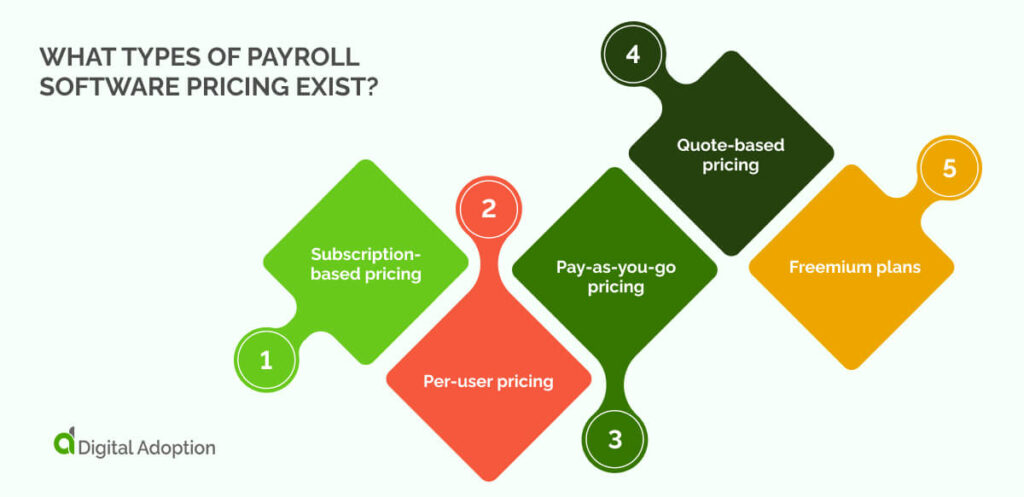
Payroll software pricing comes in a few standard formats, and each affects how you pay for the system and how the cost increases over time.
Subscription-based pricing
With subscription-based pricing, vendors charge a fixed monthly fee for platform access, with a predictable PEPM element added on top. Companies choose this when payroll volume remains stable, since the cost holds steady even as features expand.
Per-user pricing
Per-user pricing shifts based on the number of employees processed in a given cycle. It’s a straightforward model, but expenses rise quickly in during hiring periods or seasonal workforce spikes.
Pay-as-you-go pricing
Pay-as-you-go pricing charges only when you run payroll. It’s a fit for smaller teams or companies with irregular cycles because it mitigates the need for fixed commitments and keeps costs linked with how often you process payroll.
Quote-based pricing
Vendors tailor pricing to specific operational needs, data volumes, integrations, or compliance requirements. Enterprises choose this when off-the-shelf models fail to capture the scale or jurisdictional complexity of their payroll architecture.
Freemium plans
Entry-level access is complimentary, with advanced features locked behind paid tiers. It works for very small teams testing workflows before committing, though limitations often appear once additional compliance or reporting needs surface.
What are the core costs associated with payroll software?
When teams evaluate payroll software, the core costs usually fall into a few predictable categories. These are the charges that are visible from the start and directly determine your entry price before any long-term or hidden spending occurs.
For a quick overview, the table below summarizes the key payroll software costs, features, and considerations at a glance:
| Payroll Software Costs | Overview |
|---|---|
| Set-up fees | Initial costs to migrate data, configure rules, and get the system live. |
| Integrations | Charges to connect existing tools; cost reflects the bridging work needed. |
| Training costs | Upfront fees for onboarding and live sessions to reduce errors. |
| Minimum monthly fee | A baseline monthly spend required regardless of company size. |
| Cancellation fees | A penalty imposed if you sign a contract and leave early. |
| Recruitment features | Paid add-ons for built-in hiring tools like applicant tracking. |
Set-up fees
These are the up-front costs required to get the system live. Charges include migrating employee data, configuring pay conventions, planning for data ethics, and validating calculations. These expenses essentially pay for the system to be switched on and configured correctly. Here, costs can vary depending on the amount of manual work the vendor must do behind the scenes.
Integrations
If payroll software needs to connect to your existing tools, i.e., time tracking, HR systems, and accounting platforms, vendors may charge for each connection. Some integrations are pre-built or off-the-shelf, while others require additional engineering hours. These costs reflect the amount of bridging work needed to create interoperable systems.
Training costs
Even straightforward payroll tools have onboarding processes. Training fees cover live sessions, guided walkthroughs, or role-based introductions for admins and managers. The aim is to reduce errors from day one, but it’s still a direct, upfront cost that many teams forget to budget for.
Minimum monthly fee
Most vendors set a minimum monthly spend regardless of company size. This baseline ensures the vendor recovers support and platform costs. For small teams, it’s often the most significant driver of total price.
Cancellation fees
If you sign a contract and leave early, some vendors impose a penalty. Although not a recurring cost, it’s still a core commercial term baked into the pricing framework and affects your financial risk from day one.
Recruitment features
If you activate built-in hiring tools, such as applicant tracking or digital onboarding, these are often billed as paid add-ons. They are optional, but still represent a core charge tied directly to functionality, not usage patterns.
What other ongoing and hidden costs should be considered?
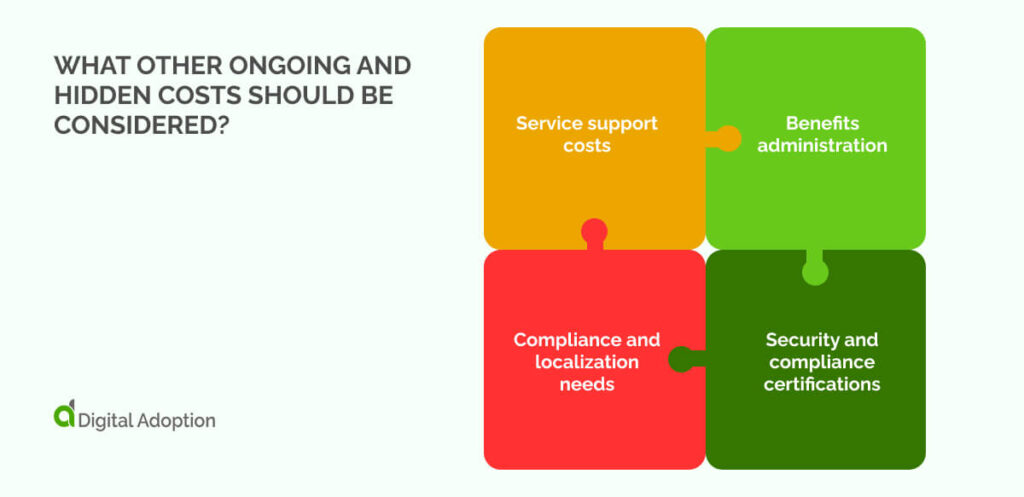
Organizations evaluating payroll software should also factor in ongoing and hidden costs that sit outside the core pricing but still add to the totals:
Service support costs
Many vendors offer basic support in the base plan, but faster response times, priority case handling, or a dedicated account manager usually incur extra fees. These services are often billed monthly or annually and become more relevant as payroll volumes grow or internal teams shrink.
Benefits administration
If a business wants to manage health, retirement, or insurance benefits within the same system, benefits administration modules can be added at an extra cost. These can be priced per employee or as an add-on package and are often required for companies with complex benefits structures.
Compliance and localization needs
Running payroll across multiple regions introduces new tax rules, labor regulations, and statutory reporting requirements. Vendors typically charge for additional country packs, localized tax engines, or extra filing capabilities. These add-ons help avoid noncompliance but increase the overall price.
Security and compliance certifications
Advanced security features such as role-based access, encryption upgrades, penetration testing, or data protection certifications may also be billed separately. While optional, these enhancements are often needed at organizations handling sensitive payroll data or operating in regulated industries to avoid rogue IT incidents.
How can you ensure payroll software pricing generates ROI?
Ensuring payroll solution delivers a measurable software ROI requires treating the purchase as a long-term operational decision rather than simply comparing features. The most reliable way to do that is by interrogating how the system performs under real-world conditions and not focusing on idealized demos.
Ask the following questions to help clarify whether a payroll system genuinely strengthens operations or simply shifts complexity somewhere else:
- How much time does it save? A credible system should materially reduce manual inputs, approvals, and exception handling. If the software doesn’t collapse payroll cycles into something predictable and repeatable, the case for ROI weakens immediately.
- How much accuracy does it add? Accuracy acts as a buffer against rework, employee dissatisfaction, and regulatory exposure. The question is simple: does the system reduce errors at their source, or does it merely shift them to another part of the process?
- Does compliance hold over time? Compliance is never static. Payroll software should sustain alignment with tax rules, statutory changes, and location-specific data requirements without constant intervention. If compliance degrades the moment rules shift, costs escalate elsewhere.
- Will it scale with your team? Growth introduces new pay structures, geographies, and edge cases. Software that performs well at one size but fractures at another rarely producesa durable ROI. Scalability is the stress test.
- Does it fit your actual needs? Misalignment is one of the most significant hidden burdens on payroll budgets. Buying too much functionality creates waste, whereas buying too little leads to retroactive workarounds. Assessing ROI depends on eliminating both extremes.
- Does it integrate cleanly with other systems?: If payroll cannot pass data cleanly to the HR department structure, fragmentation reappears in the form of duplicate entries and reconciliation cycles. Integration quality often decides whether efficiency gains hold.
- Is the pricing transparent? Ambiguous tiers and add-on fees quickly undermine ROI. Transparent pricing allows teams to forecast total cost without surprises.
- Can you validate it through a trial?: A controlled trial exposes strengths and weaknesses before purchase and confirms whether the expected ROI holds up in operational reality.
Methods for negotiating better payroll software pricing deals with vendors
Negotiating payroll software prices should be unambiguous. It’s a matter of showing vendors you understand the market, the genuine cost drivers, and what fair value actually looks like.
Here are some methods for nudging vendors toward pricing that reflects operational reality rather than inflated baselines or vague tier logic:
Set up benchmarks
Pull up recent pricing from multiple payroll providers and public SaaS software guides before negotiating. That lets you see what others with a similar size or complexity pay. If a vendor’s quote sits above the norm, you immediately gain leverage to push them down or demand equal value.
Consolidate your spend
If you use several tools (HR, time-tracking, benefits, payroll), propose bundling them under one vendor. Offering a larger commitment or consolidated contract often prompts vendors to discount fees or throw in extras. Bundles reduce overhead and simplify billing.
Carve scope and cap fees
Define which features and services you actually need, and then ask the vendor to lock in fees around that scope. Insist on caps for per-employee charges or additional service costs so your bill won’t explode when headcount or usage rises.
Leverage trials and pilot metrics
Request a trial or pilot run with real payroll data before you commit. Track how much time you save, how many errors drop, and how the system handles edge cases. If performance or value falls short, use those findings to renegotiate setup fees or discount the first term.
Negotiate commercial and exit terms
Don’t treat the contract as fixed; treat it as negotiable. Ask for a clause to prevent sudden price increases at renewal, require clear exit or data-export terms, and demand transparency around future fee changes. A strong exit clause protects flexibility and avoids vendor lock-in.
Choosing payroll solutions that can scale beyond HR
Choosing payroll software that goes beyond basic HR tasks is less about ticking boxes and more about understanding how it fits into operations.
As such, the right system keeps payments accurate, compliance intact, and processes manageable as your team grows. As a minimum, It should integrate with other tools, digitally adapt to new requirements, and avoid hidden costs that undermine value.
Looking past features to real-world performance and predictable pricing reveals whether a platform frankly supports your organization.
When selected with the knowledge gleaned from this article, payroll software becomes more than a back-office function, but a bedrock for stability and more intelligent decision-making as your business scales.
People Also Ask
-
Are compliance updates and localization changes covered in the subscription?Not always, as some vendors include basic updates in the subscription, but more complex regulatory or localization changes may incur extra fees. Always clarify what “standardized” updates cover and which situations trigger additional costs.
-
What drives pricing differences between basic payroll and full-suite HR platforms?It comes down to scope. Basic payroll handles core pay processing, while full-suite platforms bundle benefits, recruiting, compliance modules, and reporting tools. Each added feature increases licensing or per-employee fees, so differences reflect both functionality and operational footprint.
-
How frequently do vendors update pricing, and how are increases communicated?Updates vary by provider. Some adjust annually, others on contract renewal. Strong vendors communicate clearly, providing advance notice and itemized explanations. Unclear or last-minute hikes are a red flag; transparency here often predicts sustainable cost stability and ROI.