FACT CHECKED
A flawed CRM tech-buying process can create ripple effects, with 22% of sales professionals still unsure what a CRM does.
Procurers must select solutions that drive efficiency in several areas. This means selecting solutions that consider user adoption, ensure repeatable workflow processes, manage customer data, and ultimately generate healthy software ROI.
Global CRM spending is expected to reach $53 billion within the next 12 months, with 73.8% of this coming from organizations with over 1,000 employees. Getting pricing wrong can be costly, especially as the majority of CRM spending comes from large enterprises navigating complex needs.
This article outlines how to evaluate different pricing models, assess additional costs, and finalize deals that avoid technology buyer’s remorse.
What is CRM pricing?
CRM pricing is a purchasing process that examines how CRM providers structure pricing and the acquisition costs of implementing customer relationship management (CRM).
Businesses pay for upfront elements such as choosing a pricing model, specific features, and the level of access or capacity required.
Evolving costs are also considered, including the total cost of ownership (TCO), which can fluctuate as companies’ scale and teams expand. Additional TCO costs may include extra storage, expanded analytics and reporting tools, enhanced integrations and implementations, or higher levels of customer support.
Understanding CRM pricing is important because it impacts digital workflows, team adoption, and long-term budget allocation. If a company chooses the wrong plan, it may end up paying for features it never uses or fail to anticipate future upgrades.
How much does CRM pricing cost?
CRM software prices vary widely, and there’s rarely a one-size-fits-all solution that works for all organizations. Below, we break down the median price of CRM software by business size and requirements.
These ranges are flexible and only offer a loose guide to how software costs can shift. Your final price will depend entirely on your organization’s specific needs and configuration choices.
| Business size | Typical cost Per Employee Per Month (PEPM) |
| Small / start-up firms | $7–$29 |
| Mid-size businesses | $30–$80 |
| Large enterprises | $100-$300 |
Small businesses
Small businesses expect lower entry-point CRM costs, reflecting simpler needs, fewer users, and limited automation requirements. Their pricing typically sits at the accessible end of the market, offering core functionality without advanced analytics or enterprise-grade integrations.
Mid-sized organizations
Mid-sized organizations usually fall into a more feature-rich pricing band. They pay for stronger workflow tools, deeper reporting, and more tailored configuration options to support teams and more complex customer processes. Their costs reflect the need for flexibility without committing to full enterprise bundles.
Large enterprises
Large enterprises face the highest pricing tiers as they require advanced digital process automation (DPA), extensive integrations, scalability, and premium support. Their spend aligns with managing multi-team operations, sophisticated data lifecycle management, and wide-reaching customer interactions.
What are the different types of CRM pricing models?
CRMs come with different pricing models that shape how costs scale, impact budgets, and influence long-term value. Knowing how each model works helps you choose the right solution and predict costs more clearly.
Here are the different types of CRM pricing models:
| Pricing Model | How It Works | Best For / Key Advantages |
| Flat Rate Pricing | One fixed fee for unlimited system access, regardless of the number of users. | Ideal for large teams; predictable costs; full feature access without scaling licence fees. |
| Per-User Pricing | Charges based on the number of users (seats). May combine with tiered feature plans. | Suited for teams that scale unpredictably; pay only for required seats; suitable for experimental or project-based use. |
| Freemium Pricing | Basic CRM features are available at no cost, with optional paid upgrades. | Suitable for small or start-up businesses; allows testing before commitment; reduces vendor lock-in risk. |
| Tiered Pricing | Different pricing tiers (e.g., Basic, Professional, Enterprise) with increasing features at higher prices. | Enables businesses to match CRM functionality to their needs; easy to scale up as requirements grow. |
Flat rate pricing
Instead of charging based on the user volume, flat-rate pricing offers a flat fee for unlimited system access. For enterprises with a large workforce, this is ideal as charges remain predictable and consistent despite changing user volumes.
Budgeting becomes more tangible as businesses can access the full suite of features without worrying about changing licence costs or scaling budgets to accommodate increased user seats.
Per-user pricing
Per-user pricing charges are based on the number of seats used, enabling a more tailored solution for scalable strategies. Businesses can pay for specific seats, matching solutions with unique project scope and key requirements.
Per-user pricing is suited for experimental strategies and team projects that scale unpredictably. Tiered plans can be paired with user-based pricing, which outlines different feature levels to match varying operational needs.
Freemium pricing
Freemium pricing structures provide essential access to CRM solutions at no extra cost. For small and start-up companies with tight budget margins, freemium models are an excellent way to test solutions before committing to long-term agreements.
Businesses can explore features, test compatibility with workflows, and avoid vendor lock-in and purchase risks before upgrading their plans.
Tiered pricing
Tiered CRM pricing charges for solutions through different service level offerings. As seen in many platforms, service capabilities increase, offering more advanced features and functions as prices rise.
Tiered pricing usually offers basic, professional, or enterprise access, allowing businesses to fit software to their operational functions. This option means companies can scale between tiers as their automation, reporting, or customer support needs evolve.
What factors contribute to CRM pricing?
CRM expenses often exceed the listed price. Cost considerations involve looking at associated fees incurred separately from the initial purchase.
Here are the key cost considerations CRM procurers must make to gain a more accurate picture of overall spend:
| Factor | Summary | Why It Raises Costs |
| Features | More advanced tools and capabilities. | Upgrades, add-ons, and higher API use increase fees. |
| Data Storage | Space for customer data and files. | Extra charges when storage limits are exceeded. |
| Usage | Activity levels and automation volume. | Higher usage can exceed plan limits and incur additional costs. |
| Integrations | Connecting the CRM to other systems. | Paid connectors or developer work may be required. |
| Implementation | Setup, configuration, and onboarding. | One-time services or customization add to the upfront cost. |
Functionality and features
As businesses evolve, they’re requirements and needs will likely shift and increase. CRM buyers must anticipate the costs of adopting new features or functions, such as enhanced automations or reporting and analytical insights.
As these needs increase, expenses can escalate quickly through plan upgrades, paid add-ons, or higher API usage tied to more complex integrations.
Data storage
Handling and storing customer data make up an essential function of CRM software. As such, additional costs can arise as data volumes evolve and a business’s storage needs change.
Setting CRM storage limits will limit the amount of customer information, documentation, communication, and activity data. Extra charges may apply when data capacity caps are reached. The increasing need for data to improve workflows and sales capabilities means that additional storage costs should always be accounted for.
Usage
Additional usage fees may apply to highly active organizations ramping up feature usage, automated tools, or data volume. Organizations can end up paying more than expected when their usage exceeds plan thresholds.
Estimating consumption levels before purchase will help prevent exceeding unforeseen usage fees. It also makes sense to factor in peak activity periods and seasonal fluctuations to forecast ongoing CRM expenses.
Integrations
Businesses require CRMs to integrate with other enterprise software, including ERP systems, marketing and sales tools, business databases, and other integrated systems, to build a tailored enterprise tech stack.
Paying for connectors, middleware, and developer configurations is expected for organizations pursuing highly compatible systems. Use built-in integrations when you can and confirm connector costs before purchase to mitigate surprise expenses.
Implementations
CRM purchases must also factor in additional implementation costs, which involve aligning solution parameters with enterprise technologies and onboarding new users. While some vendors offer self-service setup, many CRM deployments require professional services for configuration, data governance and management, customization, and training.
These one-time costs vary widely depending on project scope, but are essential for ensuring a CRM functions as intended.
What other costs need to be considered beyond the initial purchase?
Now we’ve looked at the direct costs associated with CRM purchases, let’s step back to identify other factors that contribute to the total cost of ownership (TCO). These holistic cost factors incur throughout the entire software lifecycle and are often not calculated after the initial purchase:
Continual administration and maintenance
Adjusting user controls and permissions, workflow configurations, and data-cleaning capabilities all incur added costs as a business’s operations adapt. Companies will have to account for administrative and maintenance expenses throughout the CRM lifecycle. Many organizations need a part-time or full-time CRM administrator, which significantly adds to operational costs.
Change management and user adoption
No matter how targeted your CRM solution is, inadequate user adoption strategies and change management models can devalue investments and create more costs. Total costs can expand when time and money are spent training employees and rectifying human error not anticipated at purchase.
Third-party apps and marketplace extensions
CRMs rarely operate in a silo. Their efficacy relies on deep integrations with both internal tools and third-party and marketplace apps. This includes email platforms, marketing tools, and reporting dashboards. As you plug in more tools, the total monthly cost can increase. This means buyers should budget not just for the CRM itself, but also for any extra apps they’ll need.
How to measure CRM return on investment (ROI)
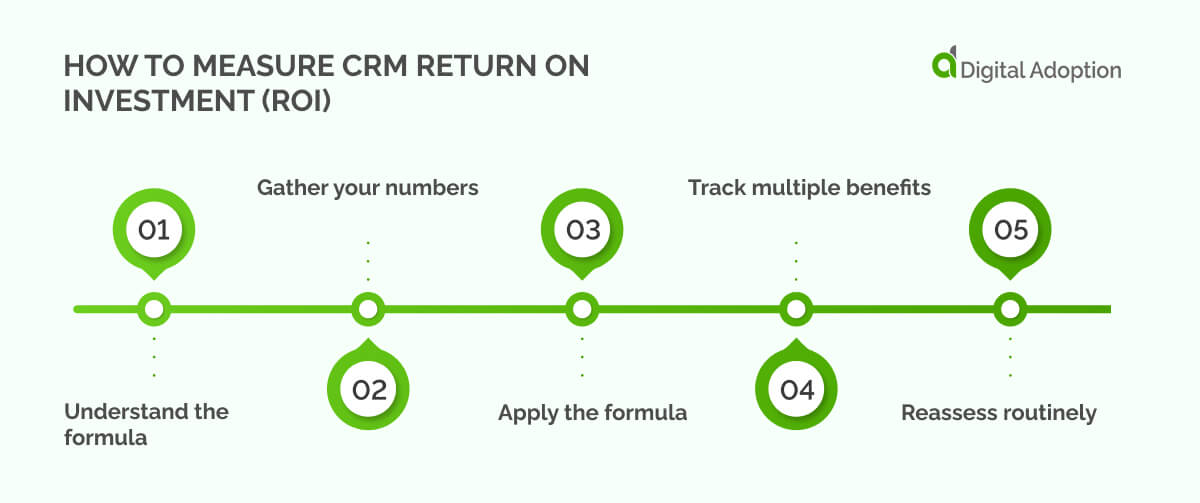
Understanding the return on investment (ROI) for your CRM shows you where money is spent and whether it drives impact. Think of ROI as a way to see how much value your CRM delivers compared to its cost. Use the five-step process below to measure CRM ROI:
Step 1: Understand the formula
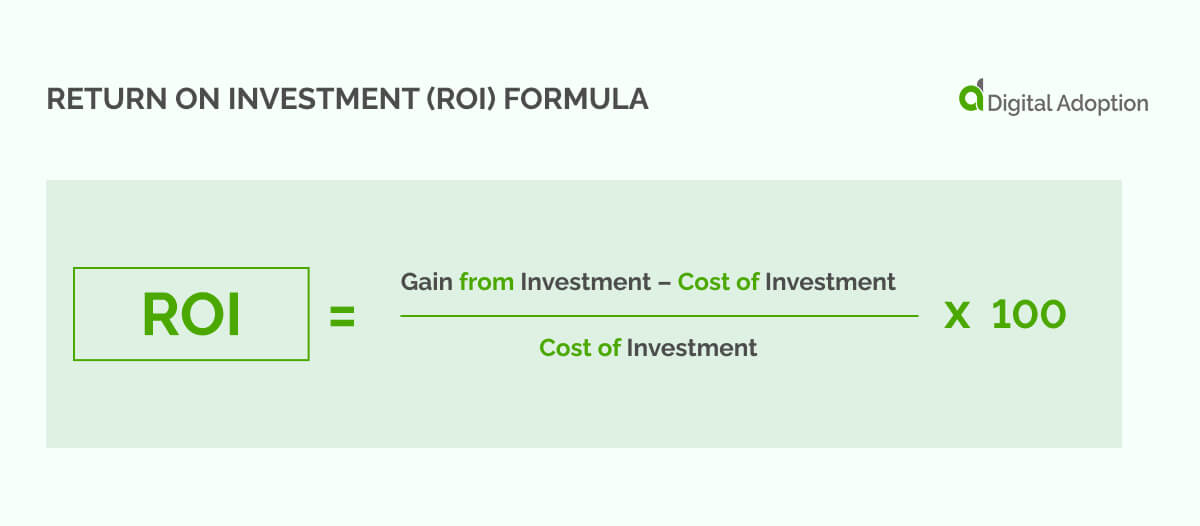
ROI = (Gain from investment − Cost of investment) ÷ Cost of investment × 100
- Gain from investment: The benefits your CRM provides, such as increased sales, faster deal closure, or higher customer retention.
- Cost of investment: All CRM-related expenses, including software licensing, setup, training, and support.
Step 2: Gather your numbers
Record your CRM costs for the year. Then track measurable gains such as additional revenue, time saved from manual processes, or reduced customer churn.
Step 3: Apply the formula
Take the extra value your CRM creates, subtract what you spent, divide by your spend, and multiply by 100 to get the ROI percentage.
Example: Your company spends $10,000 on a CRM over 12 months. With improved processes and better sales tracking, you generate an additional $55,000 in revenue.
- ROI = ($55,000 − $10,000) ÷ $10,000 × 100
- ROI = 4.5 × 100
- ROI = 450%
Step 4: Track multiple benefits
ROI isn’t just about revenue. Include softer success metrics, such as faster customer response times, reduced admin work, or improved team productivity. Then, assign monetary value where possible to get a fuller picture of your CRM’s impact.
Step 5: Reassess routinely
CRM ROI evolves as your business grows. Update your calculations each quarter to see how changes in usage, team size, or features affect your returns.
Methods for mitigating CRM expense risks
Understanding where CRM costs can increase is easy; figuring out actionable methods to mitigate CRM expense risks and implementing them is another task entirely. Let’s explore some trusted methods CRM buyers can take on board before selecting and implementing their chosen solution:
Avoid overbuying
Overbuying happens when buyers don’t accurately understand the features and functions they’re teams need. Conducting a needs analysis beforehand will help identify the capabilities required in your CRM workflows.
Explore the features you actually need through freemium or trial packages, or opt for modular service segments and scale only the features you need when needed.
Proactively improve user adoption
A CRM is only effective if users have a propensity to adopt it. Even the most tailored CRM solutions can fall short if users don’t know or aren’t willing to embrace them. Sluggish adoption rates, resource waste, and ROI can all be affected.
Allocate training budgets, set up training schemes, or deploy a digital adoption platform (DAP) to closely guide user adaptation of your CRM. Other methods include formulating a user adoption strategy and trial CRM demos in real workflows to test user compatibility.
Protect against vendor lock-in and renewal spikes
Once tech buyers enter into agreements with vendors, costly legal disputes and service-level disagreements can result in lengthy vendor lock-ins should something go awry.
Some CRM vendors offer low first-year pricing but sharply raise costs later. Others make it hard to export your data, trapping you in their system.
Read the contract closely. Ask the vendor to cap renewal increases, guarantee you can downgrade, and confirm you can easily export your data. Negotiate these protections before you sign the deal.
Which CRM pricing structure should you opt for?
Choosing a CRM is crucial given the integral role customers play in business success. What many businesses tend to overlook when dissecting CRM pricing models is the assumption that the lowest upfront cost will deliver the best value.
This, coupled with a limited understanding of CRM ROI calculations, leads to decisions that result in overspending and underutilized features.
To avoid misaligned CRM solutions, it’s critical to understand the complete cost implications across the entire lifecycle of your CRM. This involves using the calculation methods in this article to know how each pricing structure affects total spend.
Doing so will eliminate common CRM challenges and position you to secure long-term value from your investment without compromising innovation or flexibility.
People Also Ask
-
Can CRM pricing grow with my business?Yes. Many enterprise CRMs offer plans that adjust as your team or operations grow. This means you pay for what you need now, but can access extra features or seats later. Planning ahead helps avoid overspending and ensures your CRM stays useful as your business changes.
-
How do integrations affect CRM costs?Connecting your CRM to other tools, such as ERP systems, email platforms, or marketing software, may incur additional fees. These may include subscriptions, setup, or developer costs. Knowing these costs upfront helps you budget accurately and avoids surprises that could slow down workflows or create extra pressure for your team.
-
Are there any extra costs for using global CRM?Yes. Using a CRM across multiple countries can incur charges for data storage, security, and local support. These costs vary by region. Planning for them early ensures your CRM works smoothly across all offices, meets local regulations, and avoids unexpected bills.