FACT CHECKED
Customer relationship management (CRM) tools are a business’s most critical asset for achieving customer success. They serve as a central source of truth, using data to strengthen customer relationships across the entire customer lifecycle—from qualified leads through the post-sale period.
In agile organizations, however, CRMs need to be highly integrable with other business applications and ensure swift, easy data flows between them. Recent data shows that CRM technologies are now the most valued tools across finance functions, underscoring the importance of strong CRM integration.
Modern CRMs rarely operate in silos, and companies will need to integrate a range of third-party tools into their CRM to keep pace with digital transformation.
This article will delve into CRM integration, exploring what it is, the most common types of integrations, and how a strategic approach to APIs offers the best chance for success.
What is a CRM integration?
A CRM integration enables businesses to make data from essential third-party applications, legacy software, and hardware interoperable with their CRM system. This involves making data accessible in your CRM via application programming interfaces that enable integration with business-critical systems.
This streamlines data communication between your CRM and other data touchpoints, such as on-premises software and hardware, cloud services, website portals, legacy enterprise resource planning (ERP) systems, and more.
For example, customer data from billing and payment software used by sales teams, e.g., purchase details, timestamps, billing addresses, and payment metadata, can be synced to the CRM when a payment occurs. This data enriches customer profiles, providing sales with a more accurate, up-to-date view of each customer without manual data entry.
Why is CRM integration important?
How well customer care and experiences are delivered will ultimately define a company’s success. Understanding your customers at a granular level is a non-negotiable for building loyalty and trust and cultivating lifelong customers.
For businesses with an expanding portfolio, CRMs must be continuously updated with the latest data from a range of other business applications.
An integrated CRM provides the knowledge to improve customer experiences across the entire lifecycle. Having an accurate view of customer data helps sales and marketing teams speed up collaboration and communication, increasing cross-departmental agility.
CRM data syncs across apps are also ideal for digital process automation (DPA), enabling real-time systems to perform routine actions without explicit programming.
When CRM data is integrated with third-party help desk software and key data is made available, the system can automatically identify customers, open tickets, send notifications, and perform other actions it otherwise couldn’t without that data.
Visibility across all customer data touchpoints ensures projects and campaigns are accurate and easier to navigate. Integrations also paint a bigger picture through unified insights that can forecast customer behaviours and trends–ideal for focusing future strategies.
What different types of CRM integrations exist?
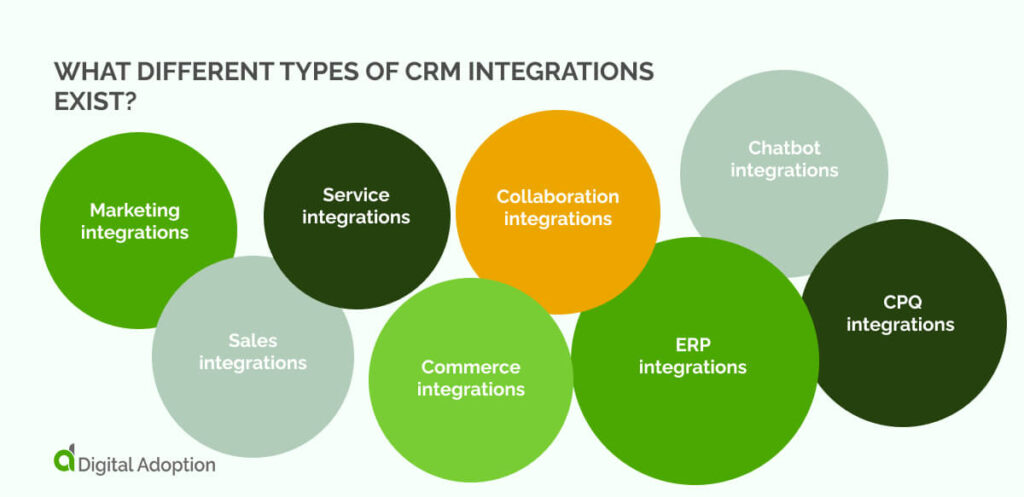
Understanding the types of CRM integration is important because each connection influences how teams respond to customers. When connections are chosen with intent, the CRM becomes a driver of growth rather than a collection of disconnected digital tools. Here are the different types of CRM integrations:
Marketing integrations
Marketing integrations allow customer data to shape how campaigns are planned and timed. When activity from forms, emails, and events feeds into the CRM, outreach reflects real interest rather than assumptions. Teams gain clarity on what resonates and can adjust messaging before opportunities cool.
Sales integrations
Sales integrations support deal progress by keeping essential information where sellers already operate. Notes, meetings, and proposals remain tied to the account with no extra effort. As deals move forward, visibility across teams improves, helping leaders identify risks early and forecast with greater confidence.
Service integrations
Service integrations give support teams immediate context when a customer asks for help. Access to account history and past interactions changes how conversations unfold. Issues are handled with awareness rather than repetition, which builds trust and reduces the time spent explaining the same problem twice.
Commerce integrations
Commerce integrations link purchase activity to customer records, enabling you to see what was purchased and when. Order details and account changes stay visible across the business. This continuity supports smoother renewals and avoids confusion once a transaction is complete.
Collaboration integrations
Collaboration integrations bring customer updates into shared workspaces where decisions ensue. Deal movement and account changes appear naturally in team discussions. This means fewer messages are needed to stay aligned and that important details are less likely to be lost across channels, thereby enhancing team collaboration.
ERP integrations
ERP integrations align customer commitments with operational systems. Financial data and order information reflect the same reality across departments. When handled correctly, teams that rely on consistent records improve handoffs, and customer promises remain grounded in what the business can deliver.
Chatbot integrations
Chatbot integrations capture early signals during customer conversations. Questions and intent are recorded as interactions unfold. When teams follow up, they do so with context rather than guesswork, making conversations more relevant from the first human touchpoint.
CPQ integrations
CPQ integrations connect quoting activity directly to customer and deal data. Product options and pricing follow approved logic while remaining easy to navigate. Quotes move forward more easily, reducing hesitation and helping protect margin without slowing sales operations.
What business processes should CRM integrations directly support?
CRM integrations deliver value when they support work that keeps customer relationships moving forward. Identifying the right processes means every connection strengthens decisions, rather than adding background complexity that you struggle to use.
Here are the essential processes CRM integrations should directly support:
| Business process | Benefit | Risk if unsupported |
| Capturing customer data | Early intent becomes visible | Interest signals disappear |
| Structuring and centralizing data | One trusted customer view | Conflicting records spread |
| Extracting analytical insights | Clear patterns emerge | Decisions rely on guesswork |
| Turning insights into action | Timely, relevant responses | Insights stall without impact |
| Tracking outcomes and performance | Effort links to results | Progress becomes unclear |
- Capturing customer data: Every interaction leaves a trail, whether someone fills in a form, asks a question, or completes a purchase. Integrations help collect those moments as they happen, so you understand interest and intent without chasing missing details.
- Structuring and centralizing data: Customer information often lives in many places, which makes it hard to trust. Bringing everything together creates a clear, reliable view that is usable, allowing you to spend less time checking records and more time helping customers.
- Extracting analytical insights: When information flows freely between systems, patterns start to make sense. You can see what customers respond to, where engagement drops, and which actions lead to progress, all without digging through disconnected reports.
- Turning insights into action: Insights only matter when they guide next steps. Integrated systems help teams act in the moment, shaping conversations, follow-ups, and priorities based on customer discovery processes.
- Tracking outcomes and performance: End-to-end visibility shows how efforts translate into results. You can follow the activity through to completion, understand what moved the needle, and use those learnings to improve future decisions.
How to strategically use APIs to approach your CRM integrations
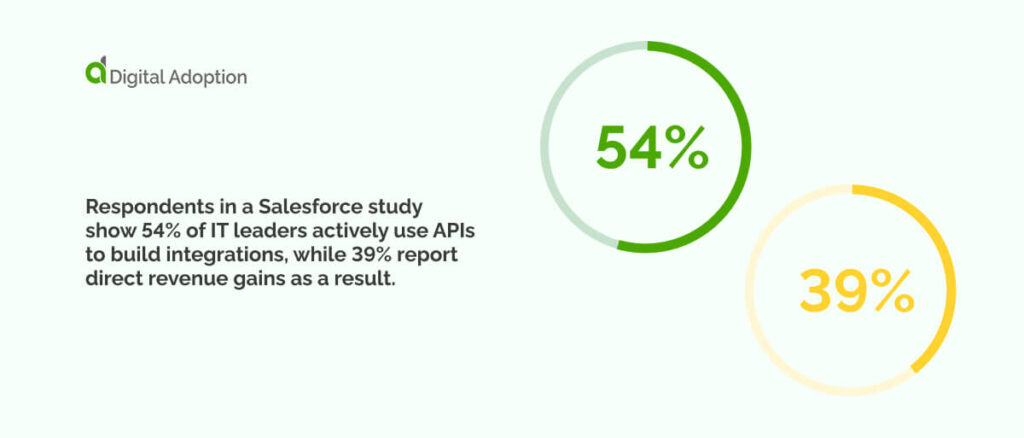
Below, we explore how application programming interfaces (APIs) are the best way to ensure reliable, thorough integrations with your CRM. Respondents in a Salesforce study show 54% of IT leaders actively use APIs to build integrations, while 39% report direct revenue gains as a result. Here’s a step-by-step method for incorporating APIs into your integration applications in a safe and measured way.
Set integration objectives
Integrating business applications with your CRM without a clear purpose often creates extra work with little payoff. Employee-focused systems such as payroll, training, or performance tools rarely benefit from customer data flowing between them. Defining a clear outcome upfront keeps API connections focused, efficient, and tied to a specific business need.
Select the right APIs
How an API integrates and performs over time shows whether it truly fits your goals. The wrong choice can lead to repeated changes when data capabilities fall short. Review API maturity, stability, and long-term support. Strong APIs are built for external use, well-documented, and clear about versioning, security, and data handling.
Map and transform data
Every system stores data differently, which means sales, marketing, and project tools won’t naturally match your CRM structure. This means that information must be translated between them. Identify connected fields, standardize date and currency formats, and define a single trusted source to avoid disrupting reporting.
Prioritize security and access control
Smooth data movement improves efficiency but can increase risk if not managed properly. Weak controls can expose systems to misuse. To avoid this, APIs should follow least-privilege access, limit unnecessary data sharing, and restrict unsupported actions. You can also rotate credentials and apply suitable authentication methods to protect sensitive information.
Build error handling and monitoring
When failures go unnoticed, trust in data quickly erodes, leading to problems. Syncs may stop, run partially, or update the wrong fields, while teams assume everything is working. Integrations need clear error handling and ongoing monitoring through dashboards, checks, and alerts that surface issues early.
Test in a sandbox first
Testing before launch helps teams spot issues with security and performance without risking live systems. Sandbox environments allow realistic testing with safe data. This often reveals assumptions or limits that written specifications alone don’t make obvious.
Design for scalability
Business needs rarely stay fixed, and integrations built for the short term can struggle as usage grows or teams expand. APIs should handle higher volumes and future AI needs without requiring a rebuild when conditions change.
Document and govern integrations
Clear documentation explains how data moves, which systems connect, and who owns each part. Governance defines powers for access, updates, and security. Together, they reduce errors and keep integrations reliable as systems change and evolve.
What to consider when selecting a CRM integration platform?
Choosing a CRM integration platform sets the tone for how well teams can rely on shared information. Small technical decisions here often surface later as delays, workarounds, or clarity, depending on how thoughtfully the platform is selected. Here are the most important considerations for deciding on a CRM integration platform:
| Consideration | What to look for | Red flags |
| Ease of use | Simple setup, clear screens | Needs technical help |
| Reliability | Runs quietly in the background | Syncs fail or stall |
| Security and data protection | Strong access controls | Unclear data handling |
| Integration flexibility and API depth | Supports custom connections | Rigid or limited APIs |
| Scalability | Grows without rework | Slows as volume rises |
| Pricing | Clear, predictable costs | Hidden or usage spikes |
- Ease of use: The platform should feel intuitive from day one. Teams need to connect systems, monitor data, and resolve issues without technical support that slows work.
- Reliability: Integrations must perform consistently, not just during setup phases. A dependable platform keeps data moving in the background, even during updates, busy periods, or unexpected system changes.
- Security and data protection: Sensitive customer information flows between systems, so protection is critical. Look for transparent controls, permissions, and compliance support that safeguard sensitive data without creating conflict for users.
- Integration flexibility and API depth: Different tools speak different languages. A strong platform adapts effortlessly, supports custom connections, and handles complex data flows without forcing workarounds.
- Scalability: Integration requirements can quickly become outdated as new solutions emerge. Choose a package that handles rising data volumes, new applications, and changing processes without requiring a rebuild.
- Pricing: Costs should scale sensibly with usage and have adequate wiggle room. Transparent pricing helps bypass shocks and ensures the platform remains sustainable as integrations expand.
Key takeaways of CRM integration done right
Customer data doesn’t exist in a CRM alone; it’s prevalent across multiple business environments, from on-site infrastructure to legacy software to third-party cloud apps.
CRM integrations can feel daunting when you only see individual connections rather than the whole system they create.
Much of that tension comes from the effort required and the range of decisions involved, which can turn technology into a distraction rather than a support.
A stronger starting point is listening closely to sales teams and anyone else who works closely with the CRM. Ask where deals stall, what slows follow-ups, and which manual steps drain time and focus.
Take stock of what already connects to your CRM, how those links influence existing processes, and which tools are likely to matter as the business grows. Salesforce research shows that companies use an average of 897 apps, with 45% reporting using 1,000 or more.
Remember to use the guidance in this article as a reference, not a shortcut, because CRMs are in constant flux. Move deliberately, weigh value against cost, and consider both immediate gains and longer-term outcomes.
Only when you do all of the above will you be in a position to really improve digital finance transformation as a whole and build a CRM environment that adapts as quickly as your customers do.
People Also Ask
-
What is API integration in CRM?API integration lets your CRM automatically exchange information with other software. When something changes in one system, such as a payment or support request, the update appears in the CRM automatically. This keeps records up to date and reduces errors caused by copying information between tools.
-
What is an embedded iPaaS solution?An embedded iPaaS is integration software built directly into a platform you already use. Instead of managing separate tools, connections are handled behind the scenes. This makes it easier for teams to link systems, monitor data flow, and maintain integrations without needing deep technical knowledge.
-
What is an alternative way to integrate with CRM systems?Another approach is using native integrations or built-in connectors provided by software vendors. These are preconfigured links designed for common tools. While simpler to set up, they often offer less flexibility and may not support complex workflows or unique data requirements as needs evolve.